(N) Count the points of the game Mölkky
Goal: I will learn how to implement a small class in C++, and I will also study the main program to learn how to use a pointer when pointing to objects.
Instructions:
Retrieve the code template: templates/05/molkky/ ->
student/05/molkky/.
Mölkky is a block throwing game where your aim is to get exactly 50 points. If a player gets more than 50 points, their score is reduced to 25 points.
In this exercise, you will implement a program to simplify point counting and following a two-player Mölkky game.
Objects and pointers in the program
The variables player1 and player2 in the main function are
instances of the Player class.
The type of the variable in_turn is Player*, which means that the
pointer will take turns pointing to one of the objects Player,
depending on whose turn it is to throw.
The next picture will give you an example:
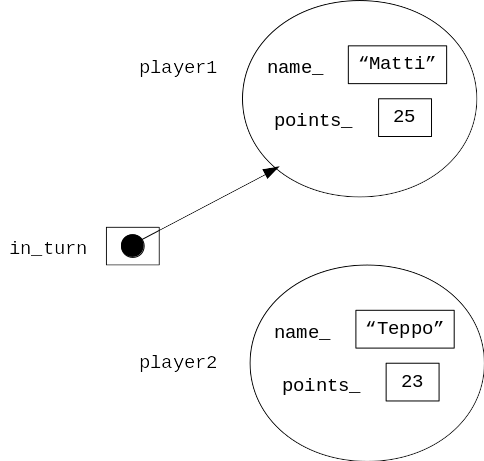
It is not necessary to understand the main program given in the template, but you can notice from it that sometimes a method is called as (by using a dot operator):
player1.get_name() // line 36
and sometimes as (by using an arrow operator):
in_turn->get_name() // line 30
The reason for the differences is that in some parts of the program (e.g. line 36) we handle an object directly, and in some other parts (e.g. line 30) we handle an object indirectly through a pointer.
Assignment
Implement the class Player which includes the information about
a single player, and all the methods that are called in the main program.
Do not make any changes to the file called main.cpp.
From the main function you can find calls of
methods get_name, get_points, has_won, and add_points.
From the calls you can conclude e.g. which parameters are passed to
these methods.
More information about the methods:
Method
get_namereturns astring.Method
get_pointsreturns anint.Method
has_wonreturns only the information if the user has won or not.Method
add_pointsupdates the points of the player.
After you have implemented the class, the program will work in the following way (in order to make the example shorter, the scores used are larger than in reality):
Enter the score of player Matti of turn 1: 24

Scoreboard after turn 1:
Matti: 24p
Teppo: 0p

Enter the score of player Teppo of turn 2: 30

Scoreboard after turn 2:
Matti: 24p
Teppo: 30p

Enter the score of player Matti of turn 3: 24

Scoreboard after turn 3:
Matti: 48p
Teppo: 30p

Enter the score of player Teppo of turn 4: 21
Teppo gets penalty points!

Scoreboard after turn 4:
Matti: 48p
Teppo: 25p

Enter the score of player Matti of turn 5: 2
Game over! The winner is Matti!
Tips for completing the assignment:
When implementing the
Playerclass, it could be useful to look at thePersonclass (from here).Please remember to create the new files in Qt Creator by choosing “New File or Project.” In the next window, choose “C++” and “C++ Class”. Then Qt Creator will automatically take care of including all of the essential files in the compiling process correctly.
After you have inserted the declaration of the method in the file
player.hh, go and test the property “Refactor” -> “Add Definition in player.cpp”. You can find it by right-clicking the method declaration.The program will not compile in case the function
mainincludes calls for methods you have not yet defined. If you want to be smart and implement your program in parts, you should first create a so-called stub of the class interface that only contains empty definitions of the methods with thereturnstatements you might need. After doing this, you will naturally do a commit to the version control (the stub of the class interface is ready).
A+ presents the exercise submission form here.